Authorized reseller | Docusign

Docusign eSignature and IAM for business

Data Express supplies Docusign eSignature and Docusign IAM to Thai organizations. We match the plan and user count to your document volume, then set up admins, SSO and Templates so your team can send documents for signature right away. We also track your renewal every year.

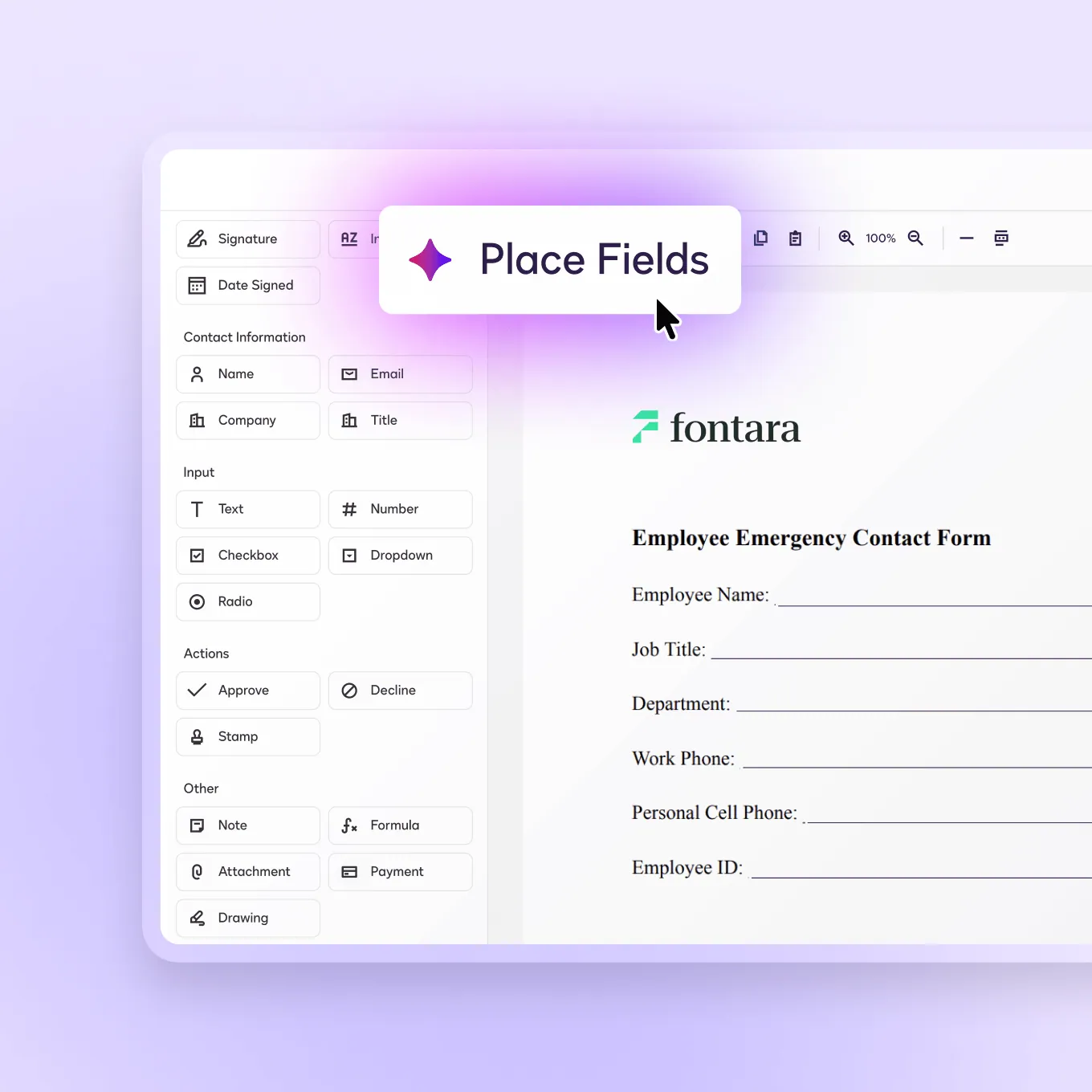
Docusign eSignature placing signature and data fields on an employee form
  • Authorized reseller

    We are an Authorized reseller of Docusign. We handle everything from plan selection and ordering to renewal.

  • Since 1988

    Serving hundreds of enterprise customers since 1988, across Atlassian, Adobe, Figma, Docusign and other brands.

  • Thai-speaking team

    Our Thai-speaking team helps set up the system, trains users and answers usage questions by phone or LINE.

Why buy Docusign through Data Express

Many organizations start with a few employees' Docusign accounts. Once a whole department is using it, questions follow: which plan, how many users, and who manages the accounts. We help you sort these out before you buy.

Plan and user sizing

We look at who sends documents, roughly how many each month, and which features you need. Then we recommend the eSignature or IAM plan that fits, so you don't over- or under-buy.

Setup that fits your organization

We set up admins, user permissions, SSO and your most-used Templates, so your team can start sending documents without trial and error.

Local Thai support

Ask about ordering, setup and usage in Thai, by phone or LINE. We also remind you before your renewal date.

Docusign products we supply

Docusign offers eSignature for sending documents for signature, and Docusign IAM (Intelligent Agreement Management) for managing agreements from drafting through post-signature. Tell us how many teams your documents pass through and which systems you use, and we will help you decide whether to start with eSignature or IAM.

Docusign eSignature

Send contracts, forms and approval documents for electronic signature. Signers can open documents on most devices, and senders can see where each document stands.

Best forAny team that sends contracts, forms or documents for signature

Docusign IAM

Docusign's Intelligent Agreement Management platform for creating, signing and managing agreements in one system, with eSignature as part of the platform.

Best forOrganizations where a single agreement passes through several departments

IAM Core

The foundation application of Docusign IAM, which you can tailor to each team's work. It includes tools to search and analyze agreements, and suits teams that don't yet have a ready-made IAM app for their work.

Best forLegal, procurement, operations and HR teams

IAM for Sales and IAM for Customer Experience

IAM apps that Docusign preconfigures for sales and customer-facing work. Teams get started faster than with a fully custom setup.

Best forSales teams and teams that work directly with customers

Contract Lifecycle Management (CLM)

Create agreements, collaborate on drafts, set approval workflows, and keep agreements in a searchable repository.

Best forLegal and procurement teams that manage a high volume of agreements

Web Forms

Collect information from signers through web forms to speed up filling in and signing. Works well on mobile.

Best forHR, employee onboarding and customer-facing forms

Docusign Iris

Docusign's AI for the platform. It turns agreement data into summaries you can act on and triggers next steps automatically.

Best forTeams that want summaries and answers from a large number of agreements

See Docusign at work

Sample Docusign screens, from preparing a document for signature to reading an agreement you've received.

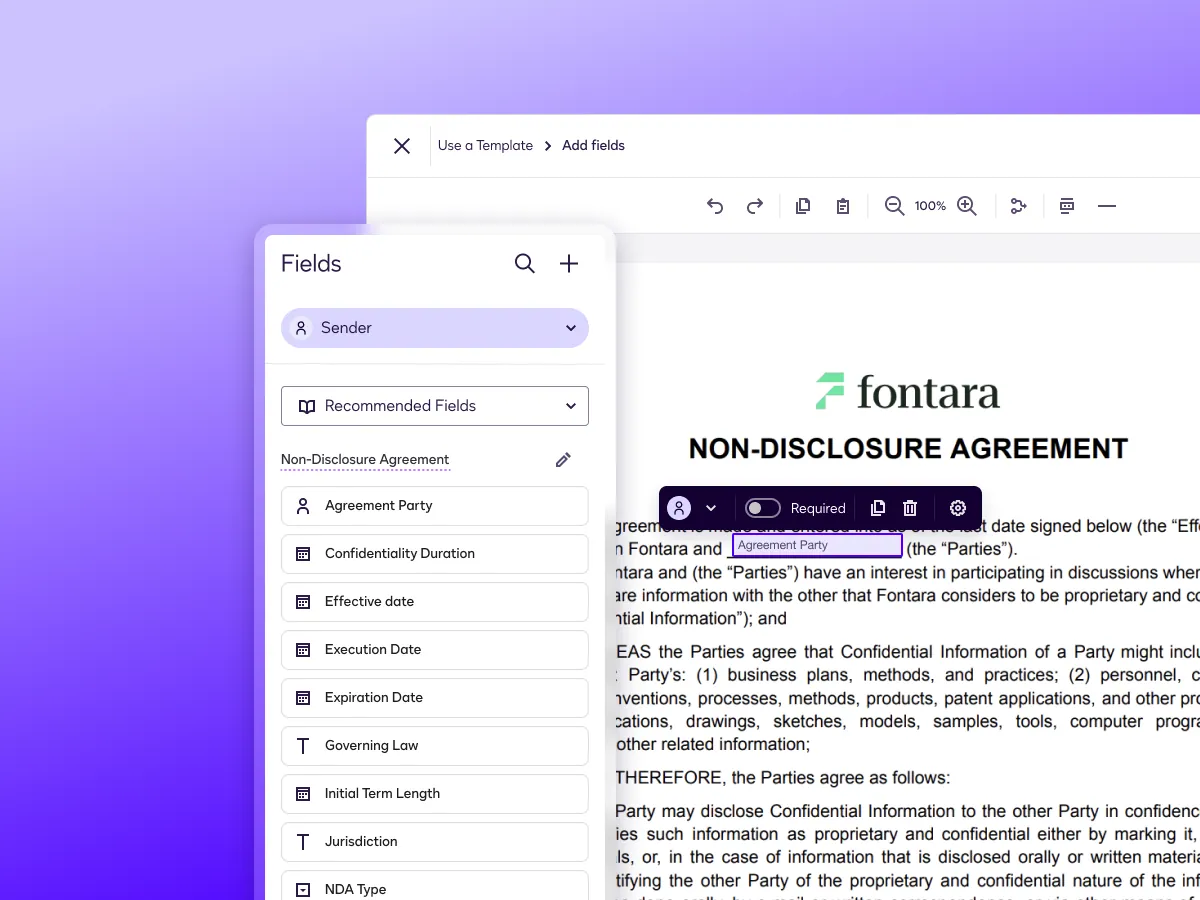
Docusign suggesting fields for a non-disclosure agreement
Docusign eSignature

Fields suggested for each document

When you prepare a document from a Template, the system suggests the fields it should have, such as the counterparty, effective date and confidentiality period. Your team reviews them and sends for signature faster.

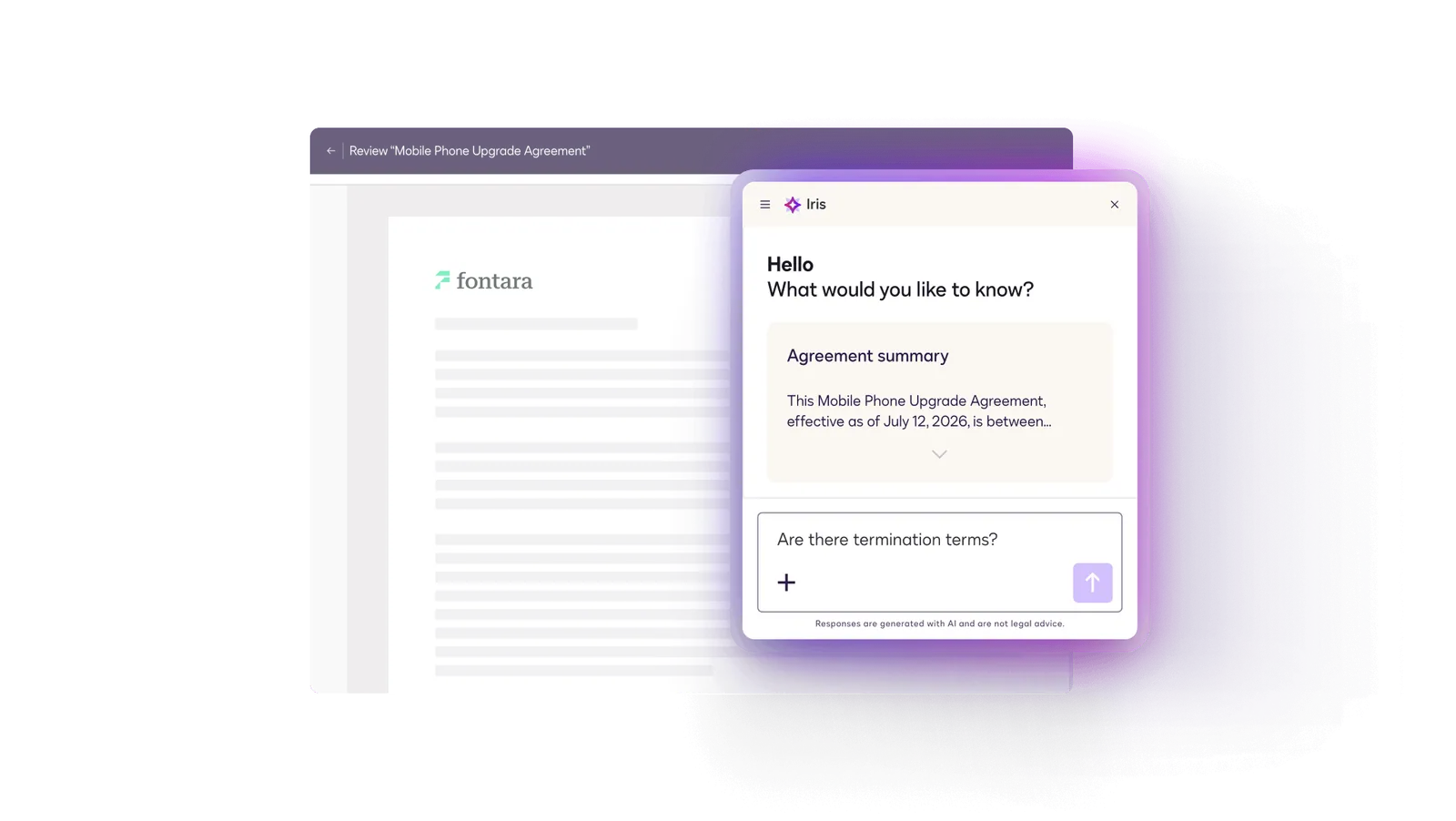
Docusign Iris summarizing an agreement and taking a question about termination terms
Docusign Iris

Ask questions about an agreement

Docusign Iris summarizes an agreement for a quick read and answers questions about its content, such as whether it has a termination clause. Your team doesn't need to read every page.

Choosing an eSignature plan

Docusign eSignature has four plans, and each higher plan includes the features of the one before it. This table is a rough comparison, and we will confirm the details with you before you order. Docusign IAM is a separate platform that includes eSignature and comes in several tiers, and CLM is scoped to each organization's needs.

PersonalStandardBusiness ProEnterprise ProDocusign IAM
Best forOne person who sends documents for signatureTeams that often send the same kinds of documents and want their own brandingTeams that need forms, payment collection or bulk sendingOrganizations that need central control of users and securityOrganizations that manage agreements end to end, not only send them for signature
Users1 userPriced per userPriced per userConfirmed before you orderConfirmed before you order
EnvelopesLimited number per monthLimited number per user per yearLimited number per user per yearConfirmed before you orderConfirmed before you order
Templates and brandingReusable TemplatesShared team Templates, instant comments and your organization's brandingEverything in StandardEverything in Business ProReusable Templates, central Template management and your organization's branding. The range of branding options depends on the IAM tier
Forms and sendingNot includedNot includedMobile-friendly Web Forms, payments during signing, attachment requests, conditional fields and bulk sendingAdds conditional workflows, Agent and Editor recipients, and shared access to documentseSignature is included in every IAM plan, with Workflow Builder. Web Forms and bulk sending come in the higher tiers
SSO and governanceNot includedNot includedNot includedSSO, Domain Control, organization-wide management, advanced signer identity verification and PDF/A archivingSSO and organization-wide management come in the higher tiers. We confirm which tier includes them before you order

Each plan has a set Envelope allowance, and it may change when Docusign updates it, as may plan names and included features. Check Docusign's website for the latest details, or ask our team before you order.

Setup and licensing services

We set up Docusign so it's ready from day one, and keep supporting you as your document volume or user count changes.

Plan and envelope review

We look at your actual number of senders and Envelope volume, then recommend a plan and user count, both when you buy and before renewal.

Admin and SSO setup

We verify your company domain, add users, set role-based permissions and connect sign-in through your company's SSO, on plans that support it.

Templates, branding and Web Forms

We build Templates for documents you send often, apply your logo and colors, and design Web Forms for work that needs information collected before signing.

Integration setup

We set up Docusign to work with Microsoft 365, Google Workspace or Salesforce, so your team can send documents for signature from the systems they use every day.

Training and renewals

We train senders and admins in Thai, at your office or online, remind you before your renewal date, and handle the renewal.

Questions buyers ask

Have another question? Call 02-437-2697 or message us on LINE at @dataexpressth.

Which Docusign eSignature plan should I choose?

It depends on how many people send documents and which features you need. Personal suits a single user. Standard suits teams that share Templates and use their own branding. Business Pro adds Web Forms, payment collection and bulk sending. Enterprise Pro adds SSO and organization-wide management. Tell us how many senders you have and what kinds of documents, and we will recommend a plan.

How are Docusign eSignature and Docusign IAM different?

eSignature is for sending documents for signature and tracking their status. Docusign IAM is a platform for creating, signing and managing agreements end to end, with eSignature as one part. If your team just needs to send documents for signature, eSignature is enough to start. If agreements pass through several departments and you often need to search them later, look at IAM.

Does Docusign work with Microsoft 365, Google Workspace and Salesforce?

Yes. Docusign has certified integrations with Microsoft 365, Google Workspace, Salesforce, SAP, Workday and ServiceNow, and an API for connecting to other systems. We set up the connections so your team can send documents from the systems they already use.

Does Docusign support SSO and central user management?

Yes. The Enterprise Pro plan supports SSO, Domain Control and organization-wide user management. Admins set role-based permissions and control usage from a single screen.

How many documents (Envelopes) can each Docusign user send?

Each plan allows a limited number, and Docusign may change it, so we don't list figures on this site. Tell us how many documents you send per month and we will confirm your allowance before you order, then review your actual usage before renewal.

How is buying Docusign through Data Express different from buying online myself?

We help you choose the plan and user count, prepare information for your procurement team, set up the system and Templates, train your team, and follow up on renewals or added users during the year.

Get a Docusign quote

Tell us how many people send documents, roughly how many documents you send for signature each month, and which systems you use, such as Microsoft 365 or Salesforce. We will recommend the right plan. Call 02-437-2697 or message LINE @dataexpressth.