
IntelliJ IDEA
Start a project in minutes
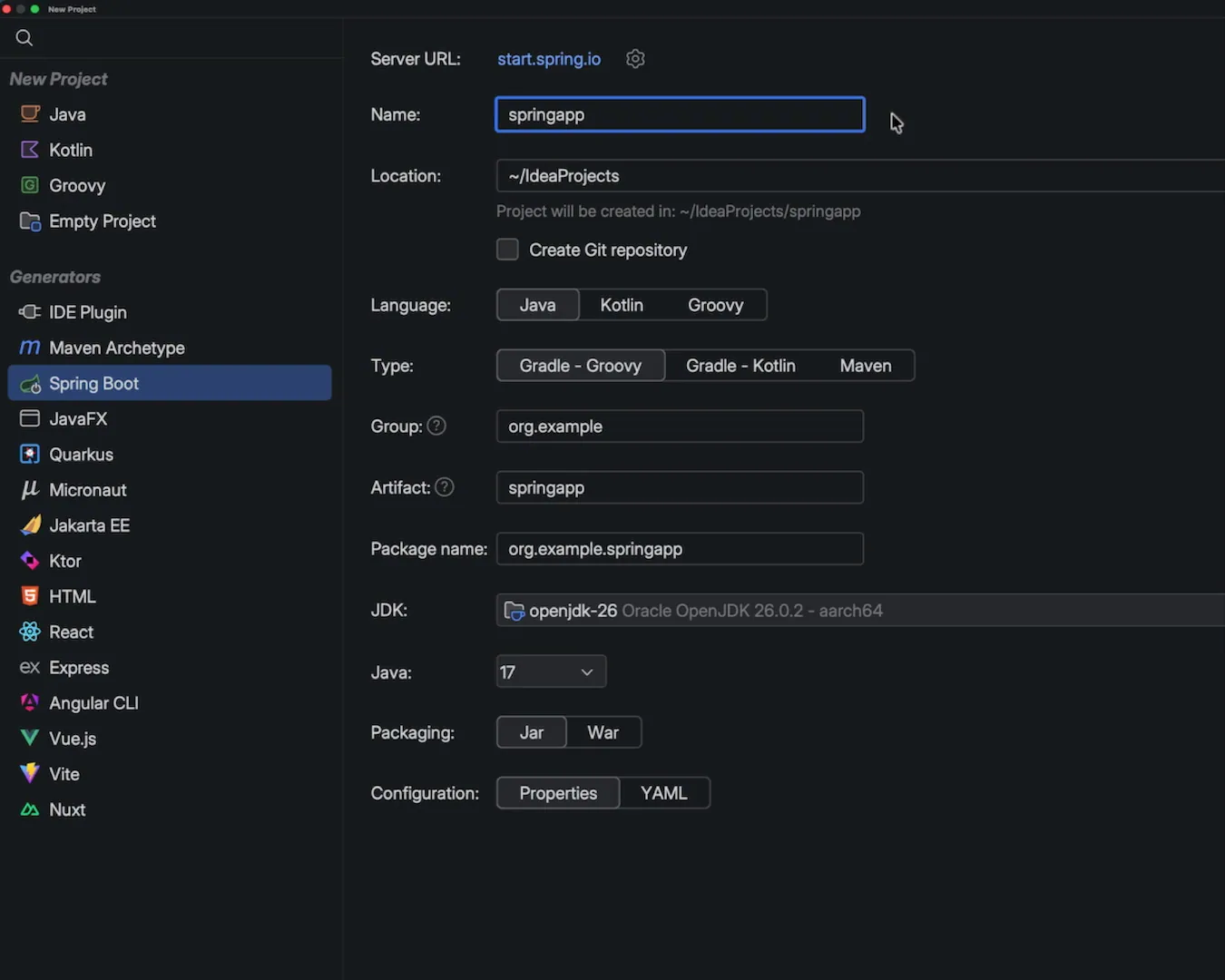
Choose the language, framework and build tool from a single screen. The IDE prepares the project structure, so your team can start coding right away.
 Authorized reseller | JetBrains
Data Express supplies JetBrains licenses to Thai organizations: IntelliJ IDEA, PyCharm and other IDEs, All Products Pack, TeamCity, YouTrack, Qodana and JetBrains AI. We size your licenses to fit your team, set up license management, and handle renewals.
We are an Authorized reseller of JetBrains. We handle ordering, adding licenses and renewals.
Serving hundreds of enterprise customers since 1988, across Atlassian, JetBrains, Adobe, Figma and other brands.
Our Thai-speaking team helps set up JetBrains Account and License Vault, and answers questions in Thai by phone or LINE.
When each developer buys JetBrains on their own and files an expense claim, accounting has to process every item and IT can't see how many licenses the company has. Buying organization licenses through us puts every license under the company's name, managed from one place.
We help count your developers and concurrent usage, then advise whether separate IDEs by language or All Products Pack is the better value.
We help set up your JetBrains Account, assign and move licenses as people join and leave, and set up License Vault for organizations with many teams.
Ask about ordering, licenses and renewals in Thai, by phone or LINE.
JetBrains for business falls into four groups: IDEs for writing code in each language; All Products Pack, which bundles the full IDE set in one Subscription; team tools such as TeamCity, YouTrack and Qodana; and AI that works inside the IDE. Tell us which languages your team codes in, and we will help you decide what to buy.
 IntelliJ IDEA
An IDE for Java and Kotlin with support for Spring, Jakarta EE, Micronaut and Quarkus, and built-in tools for debugging, testing, databases and APIs. Since version 2025.3 it is a single product, no longer split into Community and Ultimate. Core features are free, and Ultimate features require a Subscription.
Best forBackend teams and teams building enterprise systems in Java or Kotlin
 PyCharm, WebStorm, Rider and other IDEs
Language-specific IDEs: PyCharm for Python, WebStorm for JavaScript and TypeScript, Rider for .NET, GoLand for Go, PhpStorm for PHP, CLion for C and C++, RubyMine for Ruby, RustRover for Rust and DataGrip for databases.
Best forTeams that work mainly in one language, such as Python and data teams, front-end teams or .NET teams
One Subscription covering the full set of JetBrains IDEs, with AI Pro included. Developers open the IDE that fits the task right away, with no separate license for each one.
Best forOrganizations with several teams using several languages, or developers who work across languages
 TeamCity
A CI/CD server that automates building, testing and releasing software. Choose TeamCity Cloud, where JetBrains runs the server, or TeamCity On-Premises, installed on your own servers.
Best forTeams that build and release software often and want controlled Pipelines
 YouTrack
Issue tracking and project management with Workflows you can adapt to each team. Works for software teams and other teams. Choose YouTrack Cloud or a self-hosted YouTrack Server.
Best forTeams that want customizable issue tracking within the same toolset as their JetBrains IDEs
 Qodana
A code quality platform using Static Analysis across many languages. Set a Quality Gate in CI so code that doesn't meet your criteria isn't released.
Best forTeams that want to check code quality and security in every Pipeline run
 JetBrains AI
AI that works inside JetBrains IDEs. It answers code questions, completes code and works as an Agent on the same screen where you write code. Usage is counted in credits under the plan you choose. Organizations can choose AI Enterprise, part of IDE Services, to control AI usage centrally.
Best forDevelopers who want AI help writing and reading code without leaving the IDE
 Junie
A coding agent built by JetBrains. Developers hand coding tasks to Junie, then review the result before merging it into the project.
Best forTeams that want to hand part of their coding work to an AI agent
 JetBrains Air
JetBrains' platform for working with AI agents, usable in the IDE, with Air Governance so admins can set which agents and models teams may use. Organizations can use a subscription or API key from an AI provider they already have, or JetBrains AI credits.
Best forOrganizations that want teams to use AI agents under rules set by IT
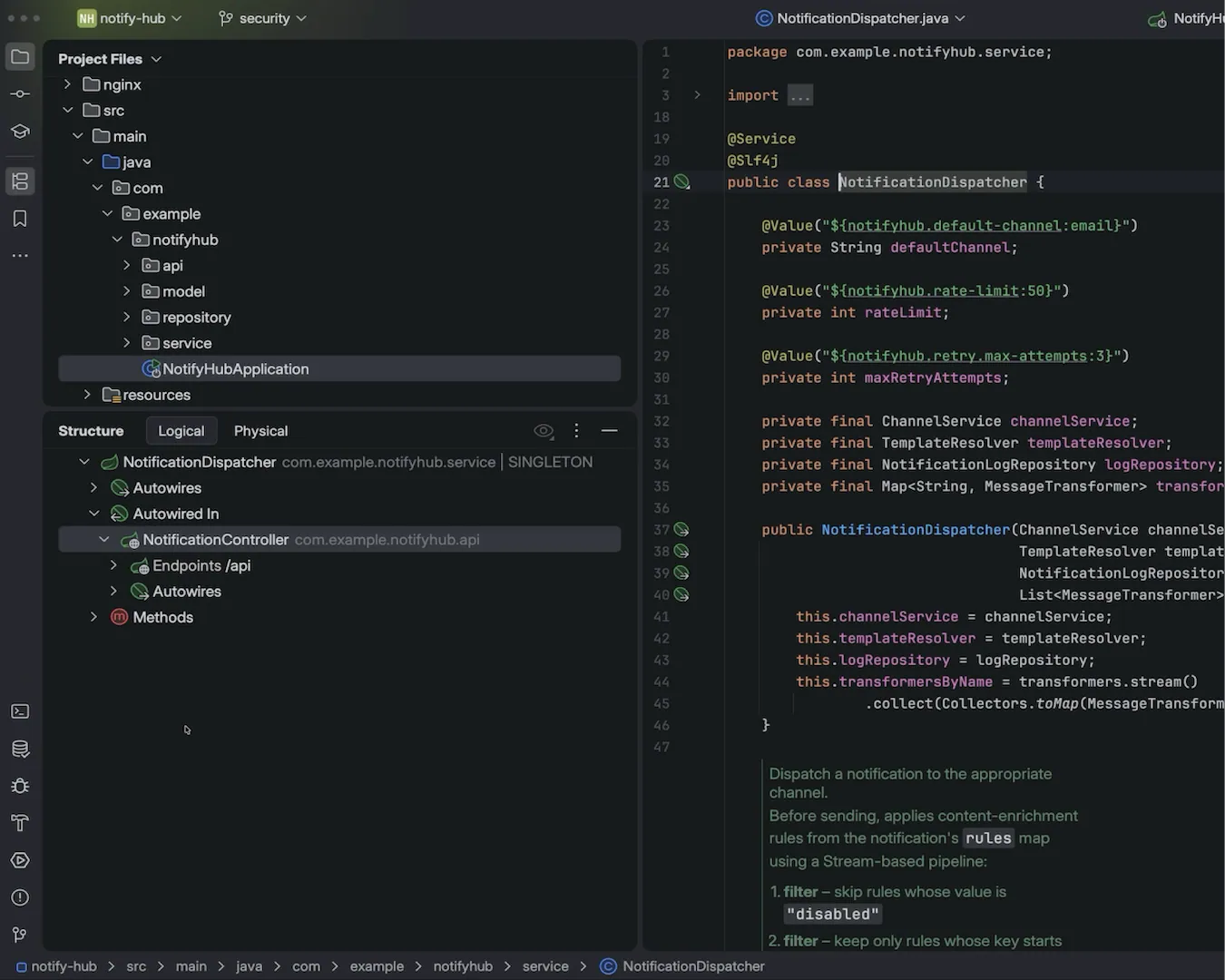
Sample screens from IntelliJ IDEA, which development teams use every day.
Choose the language, framework and build tool from a single screen. The IDE prepares the project structure, so your team can start coding right away.
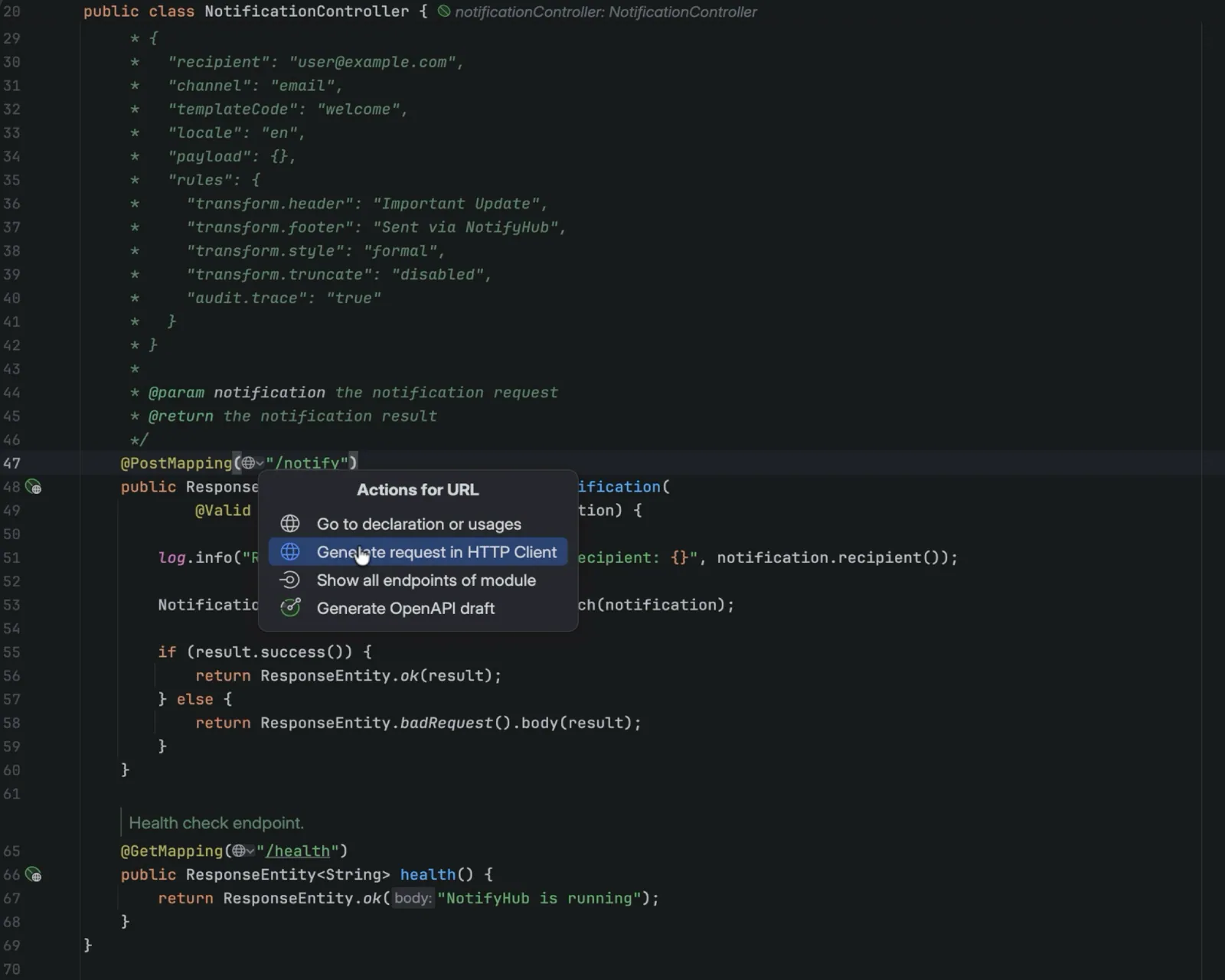
Click an endpoint in your code to create an HTTP Client request, see where it is called, or draft an OpenAPI document from one menu. Your team can test APIs without leaving the IDE.
For IDEs, you can buy just the ones you use or choose All Products Pack. For TeamCity and YouTrack, you can use the Cloud version or install on your own servers. This table is a rough comparison, and we will confirm the details with you before you order.
| Single IDE | All Products Pack | TeamCity Cloud / YouTrack Cloud | TeamCity On-Premises / YouTrack Server | |
|---|---|---|---|---|
| Best for | Teams that use one IDE, such as IntelliJ IDEA or PyCharm | Organizations whose developers use several languages and IDEs | Teams that don't want to run servers themselves | Organizations that must keep systems and data on their own servers |
| What it covers | One IDE of your choice | The full set of JetBrains IDEs in one Subscription | TeamCity or YouTrack with the server run by JetBrains | TeamCity or YouTrack installed on your organization's servers |
| Where it runs | Installed on developers' machines | Installed on developers' machines | JetBrains Cloud | Your organization's servers, managed by your IT team |
| How it is counted | Per user. Concurrent users can't exceed the number of Subscriptions | Per user. Concurrent users can't exceed the number of Subscriptions | Depends on the product. We will confirm before you order | Depends on the product and edition. We will confirm before you order |
| AI | JetBrains AI can be added | AI Pro included | Ask our team | Ask our team |
Plan names and included rights may change when JetBrains updates them. Check the JetBrains website for the latest details, or ask our team before you order.
We help you choose the right JetBrains licenses for your team from the start, and keep supporting you as the team grows or changes.
We count your developers and concurrent usage, then compare buying separate IDEs by language with All Products Pack to see which suits your team better.
We combine the needs of several teams, including IDEs, TeamCity, YouTrack and JetBrains AI, into a single order, so procurement goes through the process once.
We set up your JetBrains Account, assign and move licenses when employees change, and help set up IDE Services and License Vault to distribute licenses automatically.
We help you choose between TeamCity Cloud and TeamCity On-Premises, and between YouTrack Cloud and YouTrack Server, based on your data requirements and the team that will run it. We also advise on setting JetBrains AI usage limits.
We remind you before your renewal date, add licenses mid-term and handle your renewal on time, so your Subscription doesn't lapse.
Have another question? Call 02-437-2697 or message us on LINE at @dataexpressth.
An organization license belongs to the company, not to any one developer, and works on any computer. The limit is that concurrent users can't exceed the number of Subscriptions you bought. Tell us how many developers you have and how they work, and we will help you size it.
All Products Pack bundles the full set of JetBrains IDEs in one Subscription and includes AI Pro. It suits developers who use several languages. If your team uses a single IDE, such as just PyCharm, buying it separately is enough. We can compare both options for you.
No. Since version 2025.3, IntelliJ IDEA is a single product. Core features are free, and Ultimate features require a Subscription. If your Subscription expires, the IDE goes back to just the free features.
Organizations with 12 consecutive months of Subscription are eligible for a Fallback license for the versions available at that time. You can keep using that version, but you won't receive new versions. We help check the terms of your existing licenses and remind you before renewal.
All Products Pack already includes AI Pro. If you buy IDEs separately or want more AI usage, you can add a JetBrains AI plan. Usage is counted in credits, and admins can set who can use AI and how much. Tell us how much your team will use AI and we will recommend a plan.
Tell us how many developers you have, which languages they code in, and whether you use TeamCity or YouTrack. We will recommend the right licenses and how to buy them. Call 02-437-2697 or message LINE @dataexpressth.